AI Lesson Planning: A Step-by-Step Guide for Teachers Who Want Full Control Without Wasting Time
If you’re a teacher trying to plan lessons, hit specific standards, and still have time to breathe - this post is for you.
When I first started teaching, I had a research-based curriculum that my school had carefully selected. It was well-structured and rooted in best practices. I added to it, of course - that’s what good teachers do - but it gave me a clear roadmap. I knew that if I followed it, I was covering everything my students needed to learn. It allowed me to design meaningful learning experiences without second-guessing whether I had covered each lesson aim.
Now? Things look a little different.
I teach K–5 technology at a charter school, and part of our charter means we’re not required to follow state standards in the same way traditional schools are. But here’s the thing: we’re still expected to outperform schools in our district and state on standardized tests. So while we’re not technically standards-based, I still have to ensure my students are mastering what matters - especially across six grade levels with only about 22 lessons per year for each group.
At the beginning, I was fortunate to find a solid technology curriculum - and I still use it for my Kindergarten and 1st-grade students. It’s excellent for foundational skills like mouse control, keyboarding, and building confidence with digital tools. But as I’ve grown into this role, I’ve wanted more freedom and flexibility for the upper grades - lessons that reflect my teaching style, the tools we use, and the unique strengths I bring to the classroom.
That’s when I realized how powerful AI tools like ChatGPT could be.
📁 How I Built My Full Curriculum Using AI
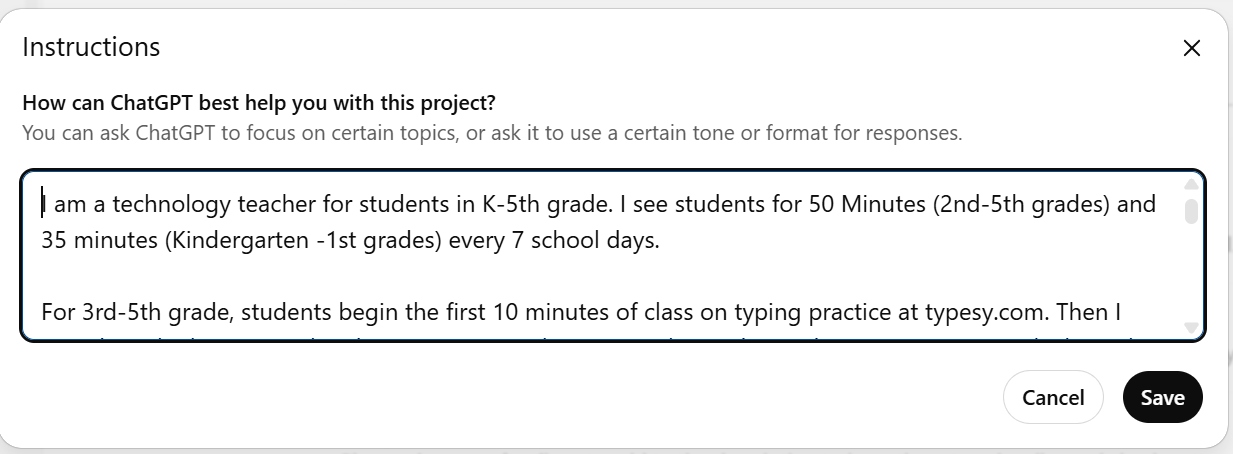
I uploaded:
The state standards
My old curriculum map
Details about how often I see each grade level
My go-to tech tools (Google Workspace, Google Classroom)
A summary of my goals, preferred type of activities, and pacing preferences
Then I asked ChatGPT:
“What am I missing? Can you generate a curriculum map by subject area and grade that includes standard numbers, ‘I Can’ statements, lesson ideas, and activities in table format?”
The AI output blew me away. It created a clear, editable map that included every major standard - organized by unit and lesson. I could see the most important things at a glance. It even included extension activities, Bloom’s Taxonomy level, and suggestions for differentiation.
From there, I started refining it into detailed plans, creating short videos and templates, and using ChatGPT to help me brainstorm better additional instructions and organize my Google Docs, PowerPoint slides, and templates. What used to be weeks of prep became something I could do in just minutes, with better results.
🌟 Real-Life Impact: From Days to Minutes
Here’s a real-world example.
Our registrar asked me to build a complex spreadsheet one year.
The first year, I spent much time searching online and testing formulas.
The second year, I used ChatGPT and finished it in a couple of hours.
This year? 15 minutes. Because now, I know how to talk to the AI and get what I need the first time.
The same goes for lesson plan structures. The more you practice with AI, the more natural it feels - and the better the ai-generated lesson plans become.
📋 A Step-by-Step Guide to AI Lesson Planning
Here’s how you can start building your own ai lesson plans today:
1. First Step: Gather Your Inputs
Your state standards or national benchmarks
Your teaching schedule (how often you see students)
Preferred tech platforms or teaching materials
Your student data, previous plans, and learning outcomes
2. Use Powerful Prompts
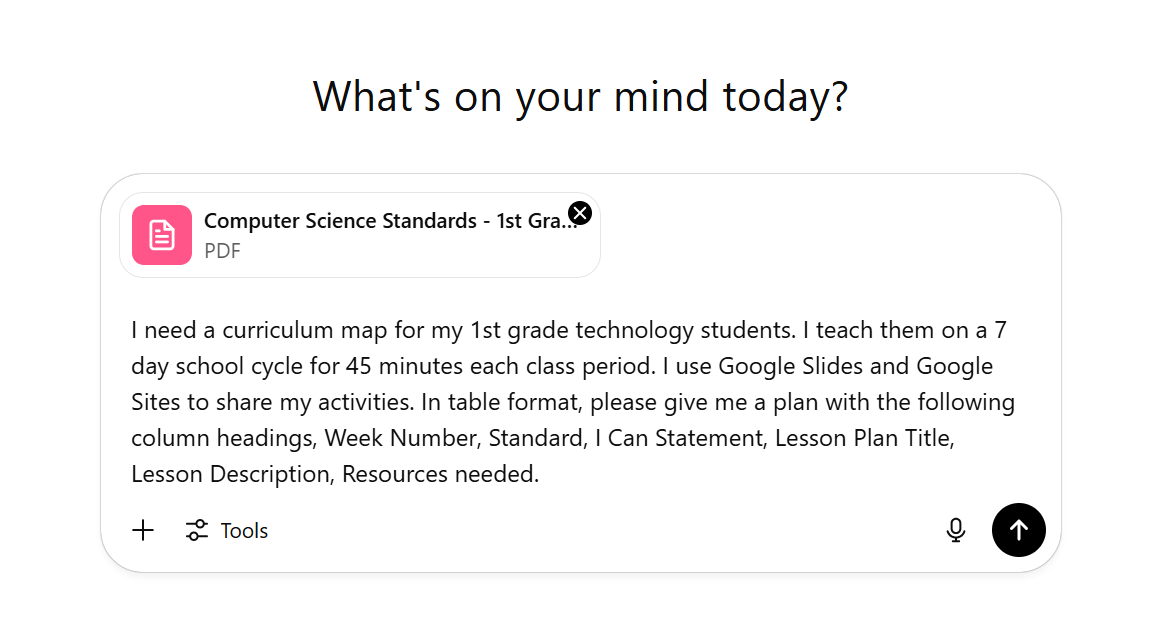
Start with something like:
“I teach [subject] to [grade level]. Each class is [X] minutes. Generate a 10-week plan that includes:
weekly topics
state standard numbers
‘I Can’ statements
engaging classroom activities
assessments and extension activities”
Want more? Ask for:
“Include Bloom’s Taxonomy level and ideas for group work.”
“Add suggestions for students who need extra help.”
“Make this friendly for a first-year teacher using free versions of tools.”
3. Edit the AI Output
Refine the results. Use your instructional leader brain to assess alignment with your core values, pacing, and the needs of your students.
4. Organize for Future Use
Use folders, checklists, and templates to save each full lesson plan. Keep versions that you can tweak later. This becomes your bank of educational resources.
🛠️ Practical Ways Teachers Use AI Tools
✅ Build a solid lesson plan with clear learning objectives
✅ Brainstorm project ideas and alternative methods
✅ Draft assessments to track student performance
✅ Write newsletters, summaries, or templates for classroom management
✅ Create a digital library of customized lesson plans
✅ Plan lessons in alignment with your planning process
✅ Automate repetitive routine tasks and reduce administrative tasks
Whether you're a new or seasoned teacher, generative AI gives you a starting point that can make all the difference.
💼 AI Lesson Planning Starter Kit: Template & Prompt Pack
If you're ready to take your AI planning to the next level, I've created a low-cost, high-impact resource you can download instantly. The AI Lesson Planning Starter Kit includes:
✅ A step-by-step guide to writing ai-powered lesson prompts
✅ Templates aligned to specific standards
✅ A checklist for effective lesson plans
✅ Real ai output examples for different grades
✅ Prompts for creating assessments, reflections, and lesson summaries
💬 Final Thoughts: The Rise of Artificial Intelligence in Education
The rise of artificial intelligence doesn’t mean teachers are being replaced. It means we have access to an innovative tool that can help us deliver more engaging ways to reach our students.
ChatGPT is not here to take away your voice - it’s here to support it. It’s a powerful ally that saves you valuable time, helps you get best results, and lets you focus on the parts of teaching that matter most.
The more you explore, the more new ideas you’ll uncover. With the right ai model and a few well-crafted AI prompts, you can create complete lesson plans that feel like your best work.
You deserve support. Your students deserve strong lessons. AI can help with both.
