If you teach in an elementary tech lab, you have probably asked yourself this question at some point:
Where do I even start with a technology curriculum?
When you teach Kindergarten through fifth grade, it can feel overwhelming. You want students to develop real technology skills, but you also want lessons to be engaging, developmentally appropriate, and aligned with standards.
I understand that feeling completely.
I have been teaching technology for several years now, and over the past five years, I have slowly built and refined my own elementary technology curriculum map. What started as a simple pacing guide has grown into a full computer curriculum that helps students build skills from their very first experience using a mouse all the way to creating presentations and exploring coding.
And honestly, teaching in the technology lab has become the most enjoyable position I have ever had in education.
It is incredibly rewarding to watch students grow year after year.
Kindergarten students walk into the room unsure how to control the mouse. They are still learning that the mouse and the cursor are connected.
By fifth grade, those same students are:
• signing into their own accounts
• typing with growing confidence
• creating presentations in Google Slides
• using Google Docs for word processing
• working through coding activities
• following student-facing instructional videos independently
Watching that progression is one of the best parts of this job.
Students will often say things like:
"That was so much fun!"
"I loved that lesson!"
And when I hear that, it challenges me to keep creating lessons that are both engaging and meaningful.
Because technology lessons should not just be fun.
They should also help students build critical thinking, develop digital literacy, and prepare them for the digital world they are growing up in.
That is exactly why I created this free elementary technology curriculum map for K-5.
Why an Elementary Technology Curriculum Map Matters
Many technology teachers inherit a tech lab without a clear plan.
There may be activities, websites, or lesson ideas scattered around, but there is no clear curriculum path showing what students should learn at each grade level.
A strong technology curriculum map helps bring structure to your program.
Instead of guessing what to teach each week, you have a full year pacing guide that shows how technology skills develop across grade levels.
A well-designed computer curriculum helps ensure students learn important concepts such as:
• digital citizenship
• internet safety
• computer science concepts
• word processing
• digital activities and projects
• using Google apps like Google Slides and Google Docs
• basic tools for creating and presenting ideas
When lessons build from year to year, students gain confidence and independence with technology.
What Is Included in This Free Technology Curriculum Map
This free elementary technology curriculum map is designed to give technology teachers a clear starting point.
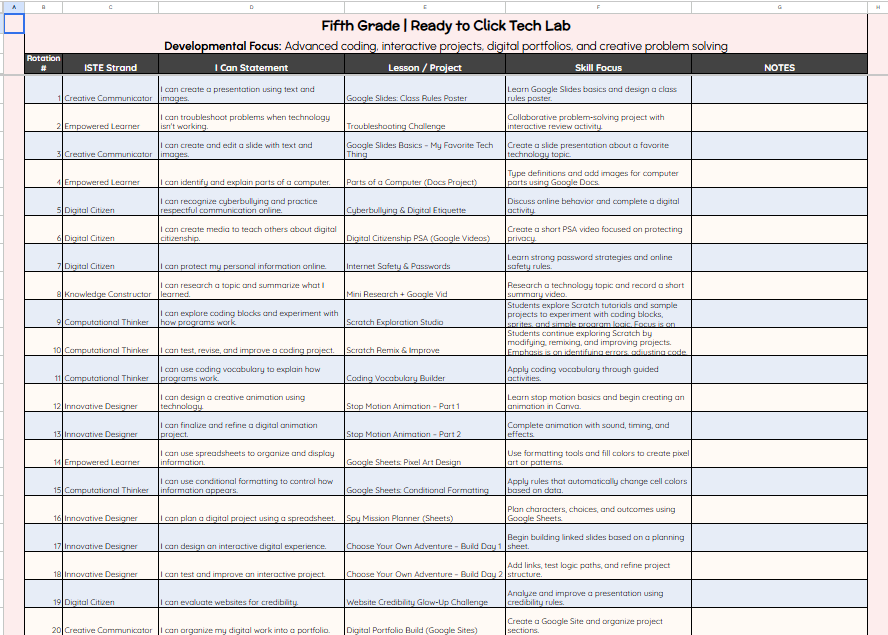
The curriculum map is provided in an editable Google Sheet, which makes it easy to customize for your own school.
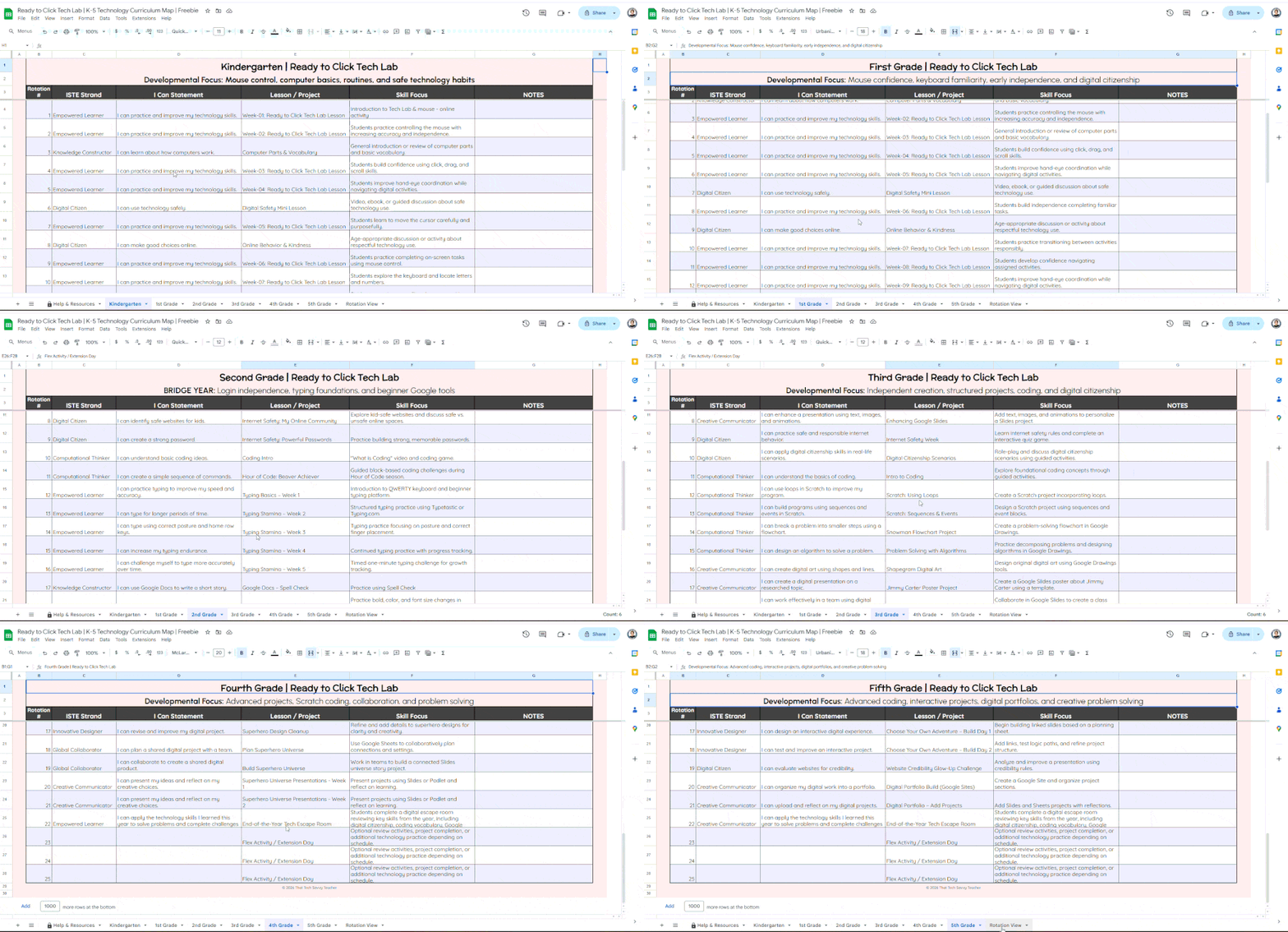
Inside the map you will find:
• ISTE standards aligned to grade levels
• student-friendly I Can statements
• key technology skills for each grade
• a simple curriculum pacing guide
• suggestions for digital activities and lesson ideas
Because it is editable, you can easily add:
• notes
• additional columns
• checkboxes for tracking progress
• links to digital resources
• reminders for projects or activities
This allows classroom teachers or tech teachers to truly make the curriculum their own.
💡How Technology Skills Develop Across Grade Levels
One of the most important things in a K-5 computer curriculum is progression.
Students should not be repeating the same activities every year. Instead, they should build new skills gradually.
Here is a simple overview of how technology skills grow across elementary grades.
Kindergarten and First Grade: Computer Fundamentals
In the early grades, students are learning the foundations of computer use.
Lessons focus on helping the youngest students develop basic computer skills such as:
• using a mouse
• understanding the cursor
• recognizing parts of a computer
• beginning keyboard exploration
• practicing digital citizenship
• understanding internet safety basics
These early lessons build the computer fundamentals students need before they can begin more complex projects.
Students also benefit from hands-on digital activities, interactive games, and visual demonstrations.
Second Grade: The Bridge Year
Second grade is often the most overlooked grade in technology education, but it is actually a key transition year.
Students begin developing greater independence with digital tools.
In second grade, students often begin learning how to:
• sign into their accounts
• navigate a learning management system
• use basic Google apps
• begin simple word processing
• insert images and format text
• follow step-by-step instructional videos
Second grade students also continue developing digital citizenship and internet safety awareness.
This is when technology skills begin to truly connect with critical thinking and problem solving.
Third Through Fifth Grade: Creating and Applying Technology Skills
By upper elementary, students are ready to use technology as a tool for learning.
Students in grades 3-5 begin working on more advanced projects such as:
• presentations using Google Slides
• digital research activities
• coding activities such as Hour of Code or Scratch
• collaborative projects
• digital literacy and media understanding
These projects help students apply their technology skills in meaningful ways.
Technology becomes more than just learning tools.
It becomes a way for students to create, communicate, and share ideas.
👦🏻👧🏻Creating an Optimal Experience for Students
One of the goals of my tech lab is to create an optimal learning experience where students feel confident working independently.
Over time, I have developed a routine that works well for my classroom.
Students begin with structured instruction, often through student-facing video lessons, and then move into guided activities or projects.
This structure helps students develop independence while still providing support.
It also allows students to progress at their own pace while still meeting instructional technology goals.
A Resource for Technology Teachers
If you are a technology teacher trying to organize your program, my hope is that this free curriculum map gives you a helpful starting point.
Technology teachers often teach multiple grade levels and juggle many responsibilities.
Having a clear technology curriculum path can make planning much easier and help ensure students are building the right skills each year.
🖥️ Want the Ready-to-Teach Lessons That Go With It?

The curriculum map is a great place to start.
But over the past five years, while teaching in my technology lab, I’ve also been building the actual lesson plans and activities that support this curriculum. Each year I’ve refined what works best for students and added new ideas as I’ve watched them grow from Kindergarten through fifth grade.
Inside my Ready to Click Tech Lab membership, teachers will have access to the lessons and resources that match this curriculum map, including:
• ready-to-teach lesson plans
• student-facing instructional videos
• activity templates
• digital citizenship lessons
• technology vocabulary games
• Click & Color activities
• tech lab posters and classroom resources
When it comes to coding, I focus on introducing students to the vocabulary and basic concepts first. After that, students explore Scratch tutorials at their own level. Some students build incredible projects, while others prefer to follow the tutorials and experiment — and both approaches lead to learning without students feeling overwhelmed.
The goal is to give students a strong introduction to computer science while allowing them to explore, create, and build confidence with technology.
And for teachers, it means having a clear set of lessons and resources already prepared, so you don’t have to spend hours searching for activities or piecing together a curriculum on your own.
❓Frequently Asked Questions About Elementary Technology Curriculum
-
A strong elementary technology curriculum should help students develop foundational computer skills while gradually introducing more advanced digital tools. This often includes:
• computer fundamentals such as mouse and keyboard skills
• digital citizenship and internet safety
• basic word processing
• using tools like Google Slides and Google Docs
• simple coding concepts
• digital literacy and responsible technology useWhen these skills are organized across grade levels, students can build confidence and independence with technology.ription text goes here
-
Teaching technology in elementary school works best when lessons follow a clear progression. Younger students begin with basic computer skills and digital citizenship, while older students begin creating projects and exploring coding activities.
Many tech teachers also use student-facing videos and guided digital activities so students can follow instructions independently while the teacher supports the whole class.
-
Digital citizenship helps students learn how to use technology safely, responsibly, and respectfully. Elementary students are often introduced to topics such as:
• protecting personal information
• recognizing safe websites
• respectful online communication
• understanding their digital footprintTeaching these concepts early helps students develop healthy technology habits as they grow.
-
Many technology teachers introduce coding through platforms like Scratch, which allows students to learn programming concepts through drag-and-drop blocks.
Scratch works well in elementary classrooms because students can explore at their own level. Some students follow tutorials step-by-step, while others begin creating their own games and animations as their confidence grows.

A Final Encouragement for Technology Teachers
Teaching technology in an elementary school can feel overwhelming at first.
But it can also be one of the most joyful teaching positions you will ever have 💛.
Watching students grow from their first experience with a mouse all the way to creating digital projects and coding is incredibly rewarding.
Every year I am reminded why I love teaching in the tech lab.
And I hope this free elementary technology curriculum map for K-5 helps you start building a program that you love teaching too.
